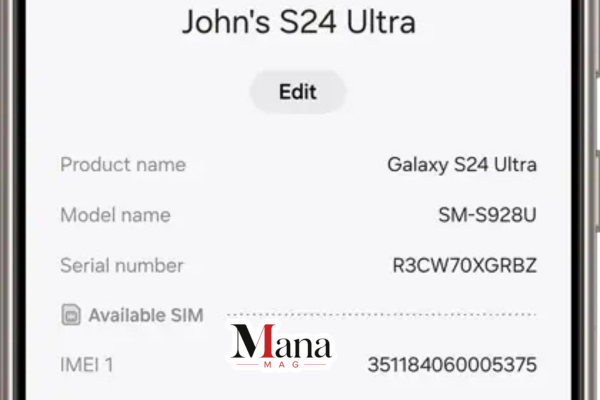
Every Samsung Galaxy phone carries a 15-digit number that acts like its fingerprint. That number is the IMEI, and whether you’re buying a used Galaxy off Facebook Marketplace, filing an insurance claim, or just trying to confirm your warranty hasn’t expired, knowing how to find and check it saves a lot of guesswork. This guide walks through where to locate your IMEI, what a lookup actually tells you, and how to avoid the common mistakes people make when buying a second-hand Samsung.
What an IMEI Actually Is
IMEI stands for International Mobile Equipment Identity. It’s a unique 15-digit code assigned to every cellular-capable device at the factory, and no two phones share the same one. Carriers, manufacturers, and law enforcement use it to identify a specific physical device, separate from your SIM card or phone number.
Most modern Galaxy phones support dual SIM, which means your device actually has two IMEI numbers: IMEI 1 for the primary SIM slot and IMEI 2 for the second slot or eSIM. Tablets and other cellular-enabled Samsung devices get an IMEI too, but Wi-Fi-only tablets don’t, since they never connect to a mobile network.
Where to Find Your Galaxy’s IMEI
There are five reliable ways to track down the number, depending on whether you have the phone in hand.
1. Dial the Universal Code
Open the Phone app and dial *#06#. The IMEI (or both IMEI numbers on dual-SIM models) pops up on screen immediately. This works on every Galaxy device, even one without a SIM card inserted, and it’s by far the fastest method if the phone is powered on and in front of you.
2. Check the Settings Menu
Go to Settings > About Phone > Status Information. Scroll down and you’ll see the IMEI listed alongside the serial number and model number. On newer versions of One UI, you can skip the scrolling and just type “IMEI” into the Settings search bar to jump straight to the right screen.
3. Open the Samsung Members App
Every Galaxy phone comes with the Samsung Members app pre-installed. Open it, tap the Support tab, then tap your device name near the top. The IMEI, serial number, and other device details show up right there, which is handy if your Settings menu is acting up or you’d rather not dig through menus.
4. Look at the Retail Box or SIM Tray
If you still have the original packaging, the IMEI is printed on a sticker on the box, usually alongside the serial number, color, and storage capacity. On some older Galaxy models with a removable back, it’s printed under the battery. On newer models, it’s sometimes etched directly onto the SIM card tray. This method is particularly useful for confirming that a sealed or “new” phone actually matches the specs the seller claims.
5. Check Your Purchase Receipt
Many carriers and retailers print the IMEI on the sales receipt or order confirmation email. If you bought the phone through a network provider, it may also show up in your online account under your device details.
What You Can Learn From an IMEI Check
Finding the number is step one. The more useful part is what a lookup tells you once you have it. Depending on the tool you use, an IMEI check can surface:
- Warranty status — whether the device is still covered and, if so, until when
- Blacklist status — whether the phone has been reported lost, stolen, or unpaid on a finance plan through the GSMA blacklist database
- Carrier lock status — whether the phone is locked to a specific network or genuinely unlocked
- Model and specs verification — confirming the exact model number (like SM-S928U), marketing name (like Galaxy S24 Ultra), color, and storage capacity
- Region and original sales market — where the device was originally sold, which affects things like warranty coverage in your country
- Knox Guard or MDM enrollment — whether the phone was enrolled in a corporate or carrier management system that could cause it to lock itself during a factory reset
That last point catches a lot of people off guard. A phone that was previously used by a company or leased through a carrier financing program can still be tied to a Knox Guard enrollment even after being wiped and resold. If that enrollment reactivates, the buyer can end up locked out of a phone that otherwise looked completely normal in the store.
Why This Matters Before You Buy a Used Galaxy
If you’re buying secondhand, an IMEI check is genuinely one of the few ways to protect yourself before money changes hands. A seller can tell you a phone is unlocked, in warranty, and problem-free, but the IMEI record either backs that up or contradicts it.
A few real scenarios where this matters:
- The “factory unlocked” phone that isn’t. Some sellers use a software workaround to temporarily unlock a carrier-locked phone. It looks unlocked until the next system update reverts it, leaving the buyer stuck. Checking the carrier lock status through the IMEI before buying avoids this.
- Ex-corporate or ex-fleet devices. Companies sometimes sell off retired phones to employees or liquidators. These can still be Knox-enrolled even after a factory reset, and the enrollment can silently reactivate later.
- Reported stolen or financed devices. A blacklist check confirms the phone hasn’t been reported lost or stolen, and isn’t still being paid off on someone else’s installment plan. If it is, it can get remotely disabled after you’ve already paid for it.
In each case, the fix is the same: get the IMEI from the seller before you hand over any money, run it through a checker, and compare the results against what you were told.
Free vs. Paid IMEI Checkers
Several third-party sites offer Samsung-specific IMEI lookups, and most start with a free basic check that returns the model, color, and storage capacity. Deeper reports, like full blacklist history, Knox status, and carrier lock details, are often gated behind a small paid fee, since that data typically requires pulling from carrier or GSMA databases rather than Samsung’s own records.
For warranty specifically, Samsung’s own site is the most reliable source, since it pulls directly from Samsung’s registration records rather than a third-party database. You’ll need a Samsung account, and you can check warranty status by signing in and entering your device’s serial number or IMEI under the warranty or product registration section for your region.
If you just need to confirm a phone is a genuine Samsung device and see its basic specs, a free third-party checker is usually enough. If you’re about to hand over money for a used phone, it’s worth paying the small fee for a full blacklist and carrier-lock report, since that’s the information that actually protects you.
Is Checking an IMEI Legal?
Yes. The IMEI identifies the device, not the person using it, so looking one up isn’t a privacy violation the way checking someone’s personal records would be. It’s standard practice among phone resellers, carriers, and insurance companies. That said, treat your own IMEI the way you’d treat a serial number: there’s no need to post it publicly online, since in rare cases it can be paired with other stolen data to attempt fraudulent claims or carrier account changes.
Quick Reference: Finding vs. Checking
| Step | What It Involves | Where to Do It |
| Find the IMEI | Dial *#06#, check Settings, or look at the box | On the phone itself, or the original packaging |
| Check warranty | Enter IMEI or serial number | Samsung’s official regional support site |
| Check blacklist/carrier lock | Enter IMEI | A third-party IMEI checking service |
| Verify model/specs | Enter IMEI | Either a free third-party checker or Samsung Members app |
Frequently Asked Questions
Does every Samsung Galaxy phone have two IMEI numbers?
Only dual-SIM models do. Single-SIM Galaxy phones have one IMEI. Most current Galaxy S, Z Fold, and Z Flip models sold in dual-SIM markets will show IMEI 1 and IMEI 2 when you dial *#06#.
Can I check the IMEI without turning the phone on?
Yes, as long as you have the original box or the SIM tray is accessible, since the number is printed or etched there. If you don’t have the phone at all, ask the seller for a photo of the box sticker or a screenshot from their Settings menu.
What’s the difference between IMEI and serial number?
The IMEI identifies the device on cellular networks and is used for blacklist and carrier lock checks. The serial number is Samsung’s internal manufacturing identifier, mainly used for warranty registration. Both usually show up together in Settings and on the box.
Will an IMEI check tell me if a phone is stolen?
A blacklist check against the GSMA database will show if a phone has been reported lost or stolen by its previous owner or carrier. It won’t catch a theft that hasn’t been reported yet, so it’s not a complete guarantee, but it catches the majority of stolen devices on the market.
Is a free IMEI checker accurate?
Basic model and specification data from free checkers is generally reliable, since it comes from the TAC (Type Allocation Code) portion of the IMEI, which is publicly documented. Blacklist and carrier data can vary in accuracy between services, since it depends on how current their database connections are, so cross-checking with more than one source isn’t a bad idea before a big purchase.
Do I need a Samsung account to check my warranty?
Yes, Samsung’s official warranty checker requires you to sign in with a Samsung account, select your region, and enter your device’s serial number or IMEI.

Must See
-


Sports
/ 2 months agoLos Angeles Chargers vs Detroit Lions Match Player Stats: 2025 Hall of Fame Game
The Los Angeles Chargers defeated the Detroit Lions 34-7 in the 2025 NFL Hall...
By Mica -


Sports
/ 2 months agoPittsburgh Pirates vs Mets Match Player Stats: August 2026 Game Breakdown
The Pittsburgh Pirates and New York Mets produced two very different games during their...
By Mica -


Sports
/ 2 months agoGolden State Warriors vs Orlando Magic Match Player Stats, Box Score and Game Analysis
The Golden State Warriors beat the Orlando Magic 120-97 on December 22, 2025, at...
By Mica